
Log In to Your DashKing88 Account
Getting back into your DashKing88 account uses the exact same credentials set at registration — no separate mobile login, no second password for the app. This page covers the login flow itself, what to do if it fails, and how password recovery works.
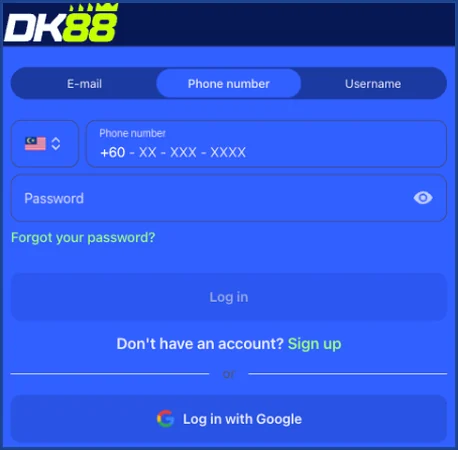
How DashKing88 Login Works
Your username (or the email tied to the account, depending on which you registered with) and your password are the only two fields the standard login screen asks for. Whether an additional verification step ever applies — say, on a new device — isn't detailed on the public site, so treat the username-and-password flow as the default rather than the only possible outcome.
Logging in through the mobile app pulls from the same account as the browser. Placing a bet, checking your balance, or claiming a promotion works identically whichever one you're using, and switching between them mid-session doesn't force a fresh login.
Logging In Step by Step
- Open the DashKing88 login page (or the app, if installed).
- Enter your username or email.
- Enter your password.
- Submit — you land on your account dashboard, balance visible immediately.
If you signed up with "Sign up with Google," logging back in works the same way: choose the Google option instead of typing a password.
None of this changes if you're switching devices — a new phone or a fresh browser install still logs in with the same username and password pair, since nothing about the account itself is tied to one specific device.
Resetting a Forgotten Password
DashKing88 doesn't maintain a separate public walkthrough dedicated to password recovery — the reset lives inside the standard email or SMS flow triggered from the login screen itself. Selecting "forgot password" (or the equivalent link on the login form) sends a reset link or code to the email or phone number on file, and setting a new password from there restores access without needing to contact support directly, unless that reset step itself fails.
Login Problems and Fixes
| Problem | Likely Cause | Fix |
|---|---|---|
| "Incorrect password" on a password you're sure is right | Caps Lock, autofill mismatch, or an old saved password | Type the password manually, checking case sensitivity |
| Login accepted but balance looks wrong | Deposit still processing, or a promotion not yet credited | Refresh, or check the cashier for a pending transaction before contacting support |
| Reset email/SMS never arrives | Spam filtering, or the email/phone on file is outdated | Check spam folders; if the contact details are outdated, reach support via Live Chat or email to update them |
| Locked out after repeated failed attempts | Security measure against brute-force login attempts | Wait before retrying, or use the password reset flow instead of guessing again |
| App and browser show different balances momentarily | Session cache hasn't refreshed on one of the two | Log out and back in on the one showing the stale figure |
Keeping Your DashKing88 Account Secure
The password you set is the main line of defence on the standard login screen, so treating it with real care matters more here than on accounts with extra verification layered on top. Reusing a password from another site, especially one you've used elsewhere for gambling or banking, is the single easiest way an account gets accessed by someone other than you — a unique password for this account specifically closes that gap without needing any extra setting inside DashKing88 itself.
If you ever suspect unauthorized access — a login you didn't make, a balance that's moved without your action — Live Chat and email are the two channels for flagging it, since there's no public self-service option to lock an account from the login screen alone.
DashKing88 Login FAQ
Your username or registered email, plus your password — the same credentials used at sign-up.
No, it's the same account and the same credentials either way.
Use the "forgot password" link on the login screen; it triggers a standard email or SMS reset, since there's no separate dedicated recovery guide published outside that flow.
Usually a caching delay on one of the two — logging out and back in on the one showing the outdated figure resolves it.
The account itself isn't geo-locked by login screen, but access more broadly follows the Prohibited Territories list in the Terms and Conditions — check that list if you're travelling outside Malaysia.